What is keyd?
A key remapping daemon for linux.
Keyd is a lightweight key remapping tool for Linux that gives you precise control over your keyboard. It can remap keys, create custom shortcuts, and simulate keystrokes to help you streamline repetitive actions. With keyd, you can tailor your keyboard behavior to match your workflow and improve productivity. It can even
Getting Started
Install
Install from source:
git clone https://github.com/rvaiya/keyd
cd keyd
make && sudo make install
sudo systemctl enable --now keyd
Configuration
I have an extra keyboard, so I use
keydto simulate keystrokes only from the other keyboard.
- Find the exact device ID:
sudo keyd monitor
After running this command, press keys on the keyboard you want to use for macros. It will display the keyboard name, ID, and other information.:
device added: 3151:4011:a2a3d108 ROYUAN 2.4G Wireless Keyboard Mouse (/dev/input/event8)
device added: 3151:4011:59783b6a ROYUAN 2.4G Wireless Keyboard (/dev/input/event7)
device added: 3151:4011:e9545600 ROYUAN 2.4G Wireless Keyboard System Control (/dev/input/event6)
device added: 3151:4011:acb87de2 ROYUAN 2.4G Wireless Keyboard Consumer Control (/dev/input/event5)
device added: 3151:4011:5b3db59a ROYUAN 2.4G Wireless Keyboard (/dev/input/event4)
device added: 320f:5055:9a3865d9 Evision RGB Keyboard Mouse (/dev/input/event29)
device added: 320f:5055:4714f8e7 Evision RGB Keyboard (/dev/input/event27)
device added: 320f:5055:10914b4b Evision RGB Keyboard (/dev/input/event26)
- Copy the ID that starts after ‘
device added:’. - In this, we’ll be using
320f:5055:10914b4b(from Evision RGB Keyboard)
- Create configuration file:
sudo mkdir -p /etc/keyd/
sudo touch /etc/keyd/default.conf
- Add the ID in
default.conf:
sudo $EDITOR /etc/keyd/default.conf
[ids]
320f:5055:10914b4b
Add Macros
The shortcuts and keys will change depends on desktop environment. In my case, I’m using Fedora 44 KDE Plasma.
I use KDE’s native shortcut configuration tool to assign custom shortcuts, and then I use keyd to trigger those shortcuts when I press specific keys on a specific keyboard.

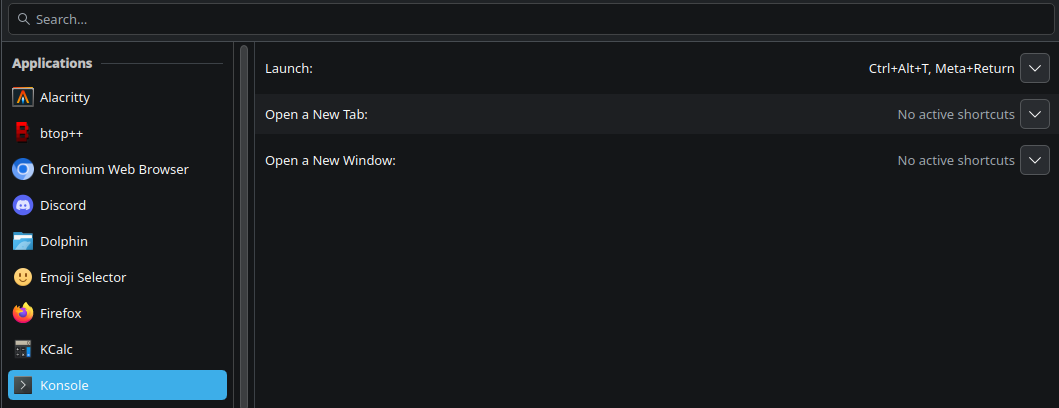
This was my early configuration, but keep in mind these shortcuts won’t work on your PC unless you assign the custom shortcuts in KDE Shortcuts Configuration tool and use keyd simulate them.
│ File: default.conf

   1 │ [ids]
   2 │ 320f:5055:10914b4b
   3 │
   4 │ [main]
   5 │ #screen-shot
   6 │ f5 = macro(print)
   7 │ #screen-record
   8 │ f6 = macro(M-S-r)
   9 │
  10 │ [control] # control + <key>
  11 │ #essentials
  12 │ e = macro(M-e)      #dolphin-filemanager
  13 │ . = macro(M-.)      #emoji-picker
  14 │ #entertainment
  15 │ d = macro(C-S-A-d)  #discord
  16 │ s = macro(C-S-A-s)  #steam
  17 │ #browser
  18 │ f = macro(C-S-A-f)  #firefox
  19 │ z = macro(C-S-A-z)  #zen
  20 │ c = macro(C-S-A-c)  #chromium
  21 │ m = macro(C-S-A-m)  #edge
  22 │ w = macro(C-S-A-w)  #waterfox